

Smart Receptionist Kamila – 24/7 Service and Modern Entrance Space at Antal Business Centre
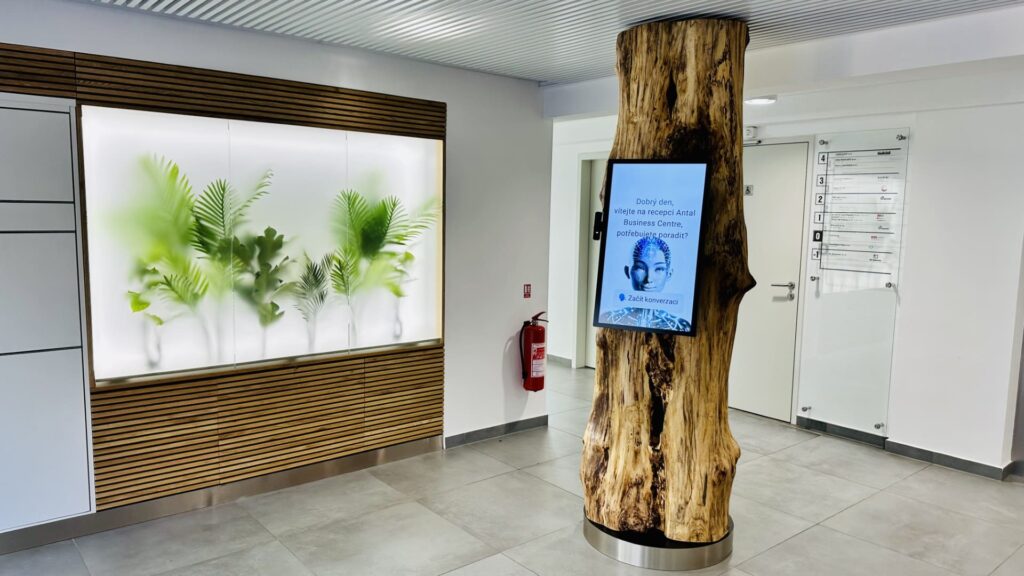
SVJ Antala Staška manages the Antal Business Centre, a modern office and commercial building in Prague 4. The property hosts a variety of companies and entrepreneurs, with a shared reception located in the atrium before access-restricted areas. The ground floor features public spaces, including a bookstore (Dobrovský), and the building also offers an adjacent parking lot for tenants and visitors.
What are the features of smart reception software?
In this case study, aReception’s AI receptionist Kamila delivers 24/7 visitor check-in, navigation & information, AI-powered Q&A, contact capturing & notifications, multi-language support, and integration options (access control, calendars, hardware kiosks incl. Zebra Android). At Antal Business Centre this led to 350+ managed visitors/month, 1,000+ answered queries, and €1,300 monthly savings.
Why We Chose Smart Reception Software
The SVJ had persistent staffing issues and, during a lobby renovation, decided to remove the traditional desk and automate visitor processing. The solution had to route visitors either to tenant receptions or designated contacts, respect different tenant rules and business hours, control elevator access to the correct floor, extend service to 24/7, provide basic building information, and handle courier deliveries (contacting the tenant during business hours or using parcel lockers after hours).
After evaluating several kiosk and automation options, the management chose aReception for its comprehensive functionality, fast customization for a multi-tenant building, voice communication via an avatar, and significant cost savings compared to a traditional reception.
How the Smart Reception Software Works
1
Feature: Interactive Terminal with AI Avatar
The entrance atrium was adapted by removing the original reception, installing parcel lockers, and integrating the aReception terminal into a unique design element—a natural tree trunk. The terminal features a moving avatar with lifelike facial expressions, capable of natural voice and touch communication with visitors.
2
Feature: Voice and Touch Interaction
Visitors activate the terminal by touch and are prompted by the avatar to state the reason for their visit. They can respond via voice (“I have a meeting with Mr. Smith.”) or by using the touchscreen buttons below the avatar—accommodating visitors with hearing impairments.
3
Feature: Visitor Check-in (kiosk + QR)
Visitors state who they are meeting, confirm the choice in the contact list, and the receptionist connects with the relevant person or company reception. The person confirms if they will come to pick up the visitor or if the elevator should be called automatically. The elevator restricts access to only the authorized floor. Backup contacts are called if necessary.
4
Feature: Handling Pre-Announced Visitors
Staff can invite visitors in advance by adding the receptionist’s special email to a meeting invitation. The receptionist then sends the visitor a QR access code for quick check-in.
5
Feature: Providing Information
The virtual receptionist can answer questions about companies in the building, parking, and operational details.
6
Feature: Navigation & On-site Information
On request, the avatar provides navigation details for the surrounding area or displays a building map.
7
Feature: Courier Check-In
Couriers can be processed even outside working hours—parcel lockers are used when the contact person is unavailable.
8
Feature: AI-Powered Q&A (Kamila)
Using advanced AI, the terminal understands visitor intent and responds appropriately.
9
Feature: Content Updates
Information and navigation tips can be continuously updated. The system logs unanswered questions to improve future content.
10
Feature: Multi-language Support
The terminal offers Czech and English. The avatar detects English and switches automatically.
11
Installation Requirements
Custom setup includes touchscreen, camera with microphone, industrial computing unit, 230V + ethernet connection, I/O module for elevator control, discreet placement, and good acoustics.
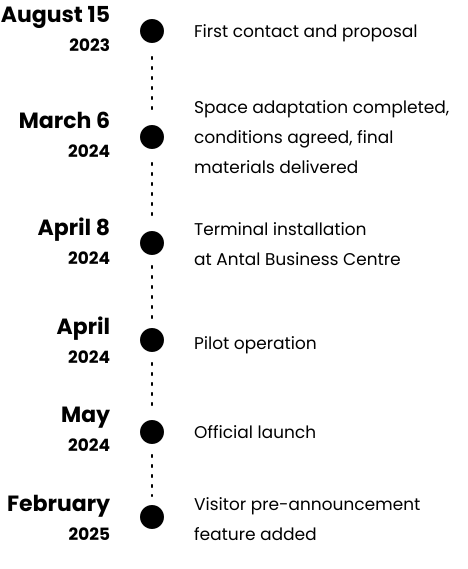
Project Timeline

Benefits & Key Features of aReception Smart Reception Software
Easy Scenario Customization
Adjustable via web admin interface available 24/7.
24/7 Operation
Designed for continuous use, seven days a week.
Scalability
Easily add more terminals that inherit existing content.
Multi-Language
Manual or automatic language switching—no need for multilingual staff.
Impact in Numbers: Smart Reception Software at Antal Business Centre
- Automated visitor and courier processing.
- Extended reception hours, saving time and energy.
- Increased tech prestige and unique visitor experience.
- Flexibility and scalability without complex maintenance.
- Better visitor orientation and higher satisfaction.
Kamila handles over 350 visitors and answers more than 1,000+ questions monthly.
FAQ: Features of Smart Reception Software
aReception Smart Reception Software
What features of smart reception software matter most in offices?
Visitor check-in, navigation & information, AI Q&A, multi-language support, notifications, and integrations with access control.
How does an AI receptionist handle security and GDPR?
By role-based access, audit logs, minimization of personal data and secure integrations with access systems.
What devices does the smart reception software support?
Thanks to Android, the smart reception software runs on many kiosks, terminals, tablets and LCDs — including fully custom builds. Remote updates keep devices current.
What ROI can we expect?
In this deployment: 350+ visitors managed monthly, 1,000+ answered queries and €1,300 monthly savings.
We Will Build Your Smart Reception
We will review your scenarios, integrations (elevators, access systems), and visual integration into the space.